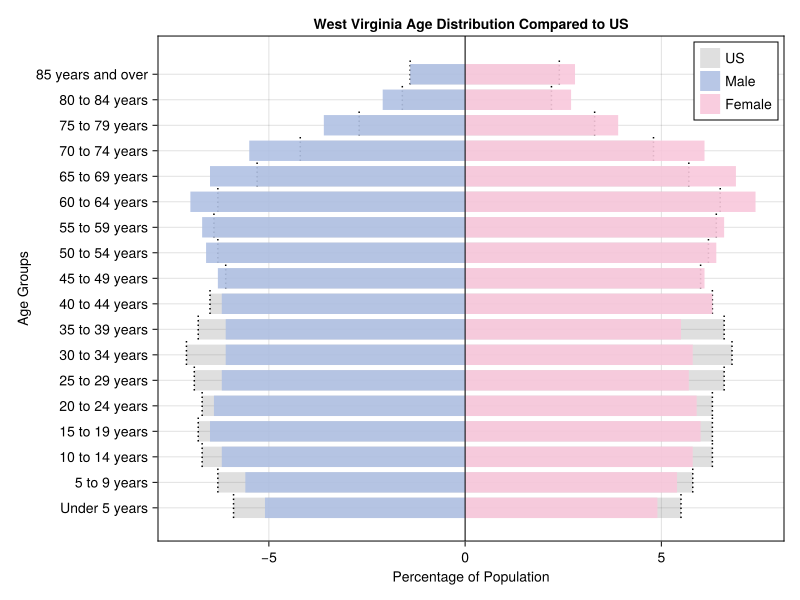
The age pyramid is a useful tool in demographic analysis. It visualizes the relative proportion of population by sex and age cohort. The shape of the curve can indicate an excess of deaths over births and give an idea of the sufficiency of the working age population to support the population not in the labor force (children and the elderly). Comparing them, however, can be challenging. This Julia script overlays a state age pyramid (in this case West Virginia) over the pyramid for the United States.
U.S. Census Bureau. “Age and Sex.” American Community Survey, ACS 1-Year Estimates Subject Tables, Table S0101. Accessed on 6 Dec 2025.
This age pyramid highlights a few clear demographic patterns for West Virginia compared to the United States as a whole:
In younger working-age categories—particularly 20–34—West Virginia has smaller bars than the U.S. This is consistent with long-term trends of younger residents leaving the state for education and employment.
The under–15 population is slightly thinner than the national proportion, suggesting declining birth rates and fewer young families.
Male and female distributions track closely at most ages, with the familiar divergence favoring more women in the oldest groups due to longer female life expectancy.
Implications
• A relatively “top-heavy” shape reflects population aging, which creates fiscal pressures on healthcare, pensions, and caregiving.
• A shrinking base signals future workforce shortages unless offset by migration or increased labor participation.
• Economic development strategies may need to focus on retaining and attracting young adults.
Overall, compared to the U.S. pyramid’s more even shape, West Virginia’s distribution points to a demographic future dominated by an older, slower-growing
The Census table has multiple columns per state. There are 637 in total. There are also two sets of age breakdowns. Early lines are devoted to trimming those. Next, the US and West Virginia data are extracted separately. Variables are renamed and the percentages are converted to numeric. The male percentaqes are made negative, so they will plot on the left side. Then it’s simply a matter of plotting the US as a gray base, overplotting West Virginia as blue and pink and then adding bars to show where the US and WV data intersect.
using CairoMakie
using CSV
using DataFrames
df = CSV.read("acs_data.csv", DataFrame)
df_selected = df[:, [names(df)[1]; [col for col in names(df) if occursin("Estimate", col)]]]
df_selected = df_selected[:, [names(df_selected)[1]; [col for col in names(df_selected) if occursin("ale!!", col)]]]
df_selected = df_selected[:, [names(df_selected)[1]; [col for col in names(df_selected) if occursin("Percent", col)]]]
df_selected = df_selected[:, [names(df_selected)[1]; [col for col in names(df_selected) if occursin("States", col) || occursin("West", col)]]]
deleteat!(df_selected, [collect(1:2); collect(21:42)])
df_us = df_selected[:, 1:3]
rename!(df_us, [:age_group, :male_pct, :female_pct])
df_state = df_selected[:, [1,4,5]]
rename!(df_state, [:age_group, :male_pct, :female_pct])
df_us.male_pct .= replace.(df_us.male_pct, "%" => "")
df_state.male_pct .= replace.(df_state.male_pct, "%" => "")
df_us.female_pct .= replace.(df_us.female_pct, "%" => "")
df_state.female_pct .= replace.(df_state.female_pct, "%" => "")
df_us.male_pct = parse.(Float64, df_us.male_pct)
df_state.male_pct = parse.(Float64, df_state.male_pct)
df_us.female_pct = parse.(Float64, df_us.female_pct)
df_state.female_pct = parse.(Float64, df_state.female_pct)
df_us.age_group .= strip.(df_us.age_group)
df_us.male_pct .= -df_us.male_pct
age_groups = df_us.age_group
df_state.age_group .= strip.(df_state.age_group)
df_state.male_pct .= -df_state.male_pct

f = Figure(size=(800, 600))
ax = Axis(f[1, 1])

y_positions = 1:nrow(df_us)

barplot!(ax, y_positions, df_us.male_pct,
    direction=:x,
    color=("gray", 0.25),
    label="US")
barplot!(ax, y_positions, df_us.female_pct,
    direction=:x,
    color=("gray", 0.25))

for (i, (m, f)) in enumerate(zip(df_us.male_pct, df_us.female_pct))
    linesegments!(ax, [m, m], [i-0.4, i+0.6], color=(:black, 1), linestyle=:dot)
    linesegments!(ax, [f, f], [i-0.4, i+0.6], color=(:black, 1), linestyle=:dot)
end

barplot!(ax, y_positions, df_state.male_pct,
    direction=:x,
    color=("#b0c1e3", 0.9),
    label="Male")
barplot!(ax, y_positions, df_state.female_pct,
    direction=:x,
    color=("#f8c8dc", 0.9),
    label="Female")

ax.yticks = (y_positions, df_us.age_group)
ax.xlabel = "Percentage of Population"
ax.ylabel = "Age Groups"
ax.title  = "West Virginia Age Distribution Compared to US"

vlines!(ax, 0, color=:black, linewidth=1)
axislegend(ax, position=:rt)
ax.yreversed = false

f